
Using the tablature format description from the paragraph above and considering only the melody buttons (right hand), the numbering would be as follows:

Diatonic Accordion Tablature
Diatonic accordion tablature represents a valuable and accessible tool for musical initiation, especially for those without traditional training in sheet music reading. Before addressing the specifics and benefits of tablature for this peculiar instrument, it's important to understand what it means and how it differs from conventional music notation.
What is Tablature?
Tablature is an alternative form of musical notation aimed at simplifying the learning of an instrument. Unlike traditional sheet music, which requires knowledge of musical notation to interpret notes and rhythms, tablature provides direct indications on how to play the instrument. In the context of the diatonic accordion, this means indicating which button should be pressed and whether the bellows should be pulled or pushed.
The Specificity of the Diatonic Accordion
The diatonic accordion is distinguished from other instruments, like the piano, by its unique organization of notes. While the piano displays a linear sequence of notes, from low to high, the diatonic accordion organizes notes in a way that is less intuitive for the novice. This feature makes tablature particularly useful for this instrument, as it can guide the learner on which button to press without the need to understand the complex arrangement of notes on the instrument.
Bisonority
Another fundamental characteristic of the diatonic accordion is bisonority, that is, the capability of each button to produce two different sounds: one note (or chord) will sound when pulling the bellows and, when pushing the bellows, pressing the same button, a different note (or chord) will be heared. For this reason, the tablature for the diatonic accordion necessarily needs to indicate the movement of the bellows.
Limitations of Tablature
Despite its advantages in facilitating initial learning, tablature for the diatonic accordion has limitations. Maybe, the more significative one is the absence of indication of the notes' duration. While traditional sheet music provides a complete understanding of the musical piece, including rhythm and dynamics, tablature focuses mainly on the location of notes. This means that musical interpretation and expressiveness can be compromised if the musician relies exclusively on tablature. To overcome this limitation, and, as a way to encourage reading traditional sheet music, tablatures are always shown immediately below the staff of the sheet music.
Another relevant aspect of tablature is that it is generated, particularly, for each instrument. Suppose there is a "G" note in a given sheet music. The tablature will indicate exactly, for the instrument in question, which button should be pressed, for example, "the fifth button of the inner row, pushing the bellows". If we change the instrument, it may be possible that the same "G" note is present in a completely different position or it may does not even exist on this new instrument. The initial tablature becomes invalid and needs to be recreated.
Diversity and Challenges of Tablature Formats
Tablature stands out for its simplified language, a less formal alternative to the conventional notation found in sheet music. This simplicity allows tablature models to take various forms, reflecting the flexibility and adaptability of this notation system. Although such variety brings the advantage of decentralizing the representative process, making tablatures potentially more accessible to different learning styles, it also can introduce significant challenges.
The diversity of formats, while reflecting the personalization of learning, can complicate the sharing of information among musicians. Each variation of tablature, being unique to the instrument or to the individual preference of the musician, may not be immediately understandable to others, requiring a period of adaptation or even the search for a common denominator in terms of graphic representation and symbols used.
For this reason, a certain degree of standardization is desirable. Guidelines or universal symbols that allow clear representation of specific actions, like the direction of bellows movement in the diatonic accordion, the numbering of buttons and rows, and how to represent the bass buttons, among others, are necessary elements.
This approach maintains the accessible and uncomplicated nature of tablatures, at the same time as it provides a common base to significantly improve the exchange of musical information. It is important to stress, such standardization does not eliminate personalization and flexibility, features that make tablatures especially attractive to musicians.
Tablature Formats in This Project
In our “Map”, we chose 3 different tablature formats that can be used in learning. Are they:
German Format
Cyclical Numeric Format
Continuous Numeric Format
Note: For each of them, there may be variations, as we will explain later.
The German Format
This was the basic tablature format we adopted since the beginning of this project. We call this format the “German Format” because it was derived from the teachings of Yann Dour, in his book “Schule für Diatonisches Akkordion – Band 1”.
Essentially, the format consists of numbering the buttons, in each row, from top to bottom, that is, from the chin towards the knees, from 1 to “n”, where “n” means the last button on the row. To differentiate the rows, apostrophes [ ' ] are used; the first row (the outermost) will not be marked with any apostrophe; the second row receives one character; the third row (if it exists) will receive two characters [ '' ] and so, successively, to each new line, an extra apostrophe will be added.
Consider the arrangement of the buttons on a given accordion, as seen in the below-left image:
Using the tablature format description from the paragraph above and considering only the melody buttons (right hand), the numbering would be as follows:
This way of numbering the buttons is very intuitive and can be applied to any accordion.
Note about the keyboard layout
Before we continue talking about the tablature format itself, let's focus on how we represent the layout of the accordions' keyboards in this project. Look at the above-left figure
Notice that we use the symbols from the "Chord Notation System" (explanatory note) to represent the notes and chords on the buttons - it is also possible to display the Latin names of the notes, as we will see later. We know that the "Chord Notation System" is primarily used to designate chords, so, in order to make it compatible, in this material we adopt the following conventions:
We call "melody buttons" the buttons that are played with the right hand and "bass buttons" those that are played with the left hand.
We use bipartite circles to represent the bisonority of the accordion buttons. Always, the upper half of the button represents the note (or chord) that will sound when pushing the bellows, and the lower half, the note (or chord) that eill sound when pulling the bellows.
The notes (both melody and bass) are represented by uppercase letters.
- For example, the note “Mi” is represented by the letter “E”
Accidentals, like sharps and flats, are normally represented.
- For example, the note "Fá sharp”, is represented by “F#”
The chords (of the bass) are represented by lowercase letters.
- For example, the chord “Ré major”, is represented by the
letter “d”
Minor chords, in addition to the lowercase letter, are complemented with a hyphen (-).
- For example, the chord "Lá minor”, is represented by “a-”
Finally, the Tablature: Putting it all together
Now that we have learned how to number the melody buttons and how to represent the bass, let's see how we will combine all this in the tablature.
An accordion tablature can be well represented by a table with 3 rows:
The top row represents the bass notes (left hand).
The second and third rows display the buttons played with the right hand, where the second row shows which buttons should be pressed while pushing the bellows and the third row shows the buttons pressed when pulling the bellows.
The vertical lines represent the bar lines.

Despite the simple design of the example above, a lot of information is shown simultaneously. Two measures are represented, as seen:
In the first, pushing the bellows, the "G bass" note (G) is played while, simultaneously, the button 5 of the inner row (notice the apostrophe) is pressed. Next, the "G major" chord (g) is played, still pushing the bellows, along with button 5 on the inner row.
The second measure indicates the D "bass note" (D) execution along with the button number 6 of the first (outer) row, this time, pulling the bellows. Then, it shows the playing the "D major" chord while pressing button number 6 on the first (outer) row, still pulling the bellows.
As you can see, we use letters from the "Chord Notation System", in accordance with our conventions, to represent the basses, just as, to represent the notes of the melody, we use numbers (with or without apostrophes) in the manner described for this format.
Note about the basses:
In our project, for any tablature format, the basses will always be represented by the "Chord Notation System". We understand that, when we talk about diatonic accordions, we are talking about a very small number of bass buttons (8 or 12 normally), making it easy to memorize. Some tablature systems number both the melody rows (right hand) and the basse rows (left hand).
The tablature that will be produced by our "Mapa" is very similar to the example above. It will be shown like this:

The main difference appears in the first column on the left: we use the word “Bass” to identify the bass line (left hand) and the melody lines (right hand) are identified by the symbol “TAB”, adding the symbols “>><<” to identify the line when pushing the bellows and the symbols “<<>>” to identify the line when pulling the bellows. By the end, each measure will be separated by the vertical bar and will contain as many columns as necessary.
Teh German Format – Numbered Rows
So far, we have described the basic tablature model that we adopted in this project. Let's add a small variation, which we will call "Numbered rows": instead of marking the rows with apostrophes, let's number them, starting from the outer row, which will be indexed with the number 1, counting up to “n”, towards the innermost row, this way:
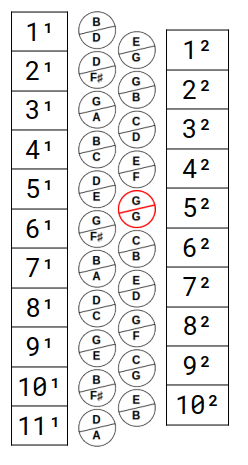
In this new model, the same example of the previous tablature is represented as follows:

In this new format, using the same tablature as the previous item as an example, the representation looks like this:
The Cyclic Numeric Format
This new format, which we call "Cyclic Numeric", eliminates the need to number the rows because they are numbered, each starting with a different ten. Of course, the rows may have more than 10 buttons, which will cause button numbers to be repeated. This actually happens, but it can be overcome with some subterfuge, such as adding an additional character to differentiate the buttons with repeating numbers.
For this new format, in addition to changes in the tablature, the keyboard layout map itself will be shown differently. We will have two variants, which we will call the "Numeric Cyclic" and "Numeric Cyclic - Numbers Only", like that:
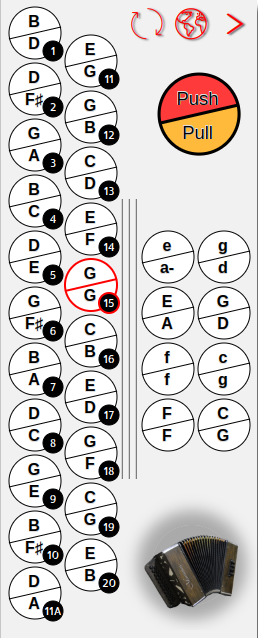
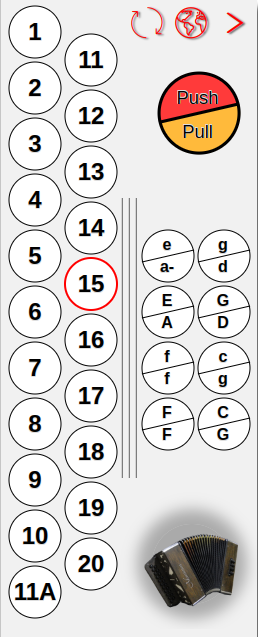
The figures above show the two variants of this format: in the left figure, the names of the notes remain, however, thumbnails indicating the numbering are added; in the second variant (on the right), the names of the notes disappear from the keyboard layout, leaving only the numbers.
In the example above, it is also possible to see that it was necessary to disambiguate button 11, which occurs at the end of external row, from the button which starts the second row (inner). The letter "A" was used to differentiate them.
Note: This same letter "A" will also appear in the tablature, if the button in question is used in the song.
The tablature, in turn, will look like this:

The Continuous Numeric Format
The third (and the last) format that we now present was inspired by the numbering that some manufacturers use to differentiate the buttons.
Starting from the outermost button, at the top, count from 1 to "n", with "n" being the last button of the innermost row. This eliminates both the need to number the rows and the need to use extra characters to differentiate buttons, but, just as in the cyclic numeric format, this format also presents problems due to the keyboard layout.
To overcome these difficulties in identifying each button, the keyboard map must again show the respective numbering. In this way, as in the previous format, we have two variants that we will call "Continuous Numeric" and "Continuous Numeric - Numbers Only", as seen below:
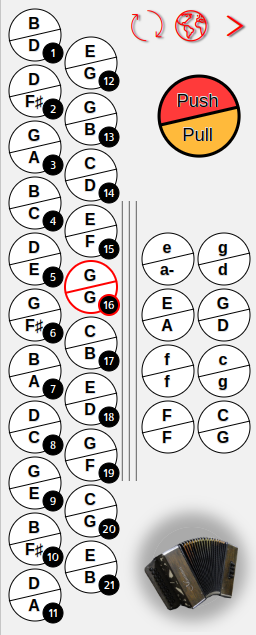
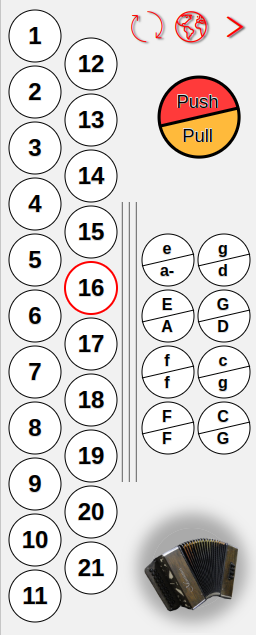
This format is very similar to the previous one, but some changes are visible. Note that there is no duplication in button 11, however, the second row starts with number 12.
Observe the segment of the tablature below (it is the same as the previous example) and notice that the note “G“ is now counted as button 16 (previously it was number 15).

Other Elements of the Tablature
As seen in the tablature excerpt above, some extra elements can appear.
In the first measure, for example, there are no bass sounds; only melody notes as listed, represented by 2 times the button 16. Note that, in the first third of the measure, there is no sound at all (it is a pause). Thus, to represent the pause, a bar, similar to a dash "–", was used.
Another very common element is the sound continuity symbol. For example, in the second measure, the A minor chord "a-" starts along the note from button 16 and should last during the execution of this note and the next (button 15). An arrow "→" is used to represent this continuity. That is, the "A minor" chord is played along with note 16 and this will be maintained until the time of note 15 ends.
Chord Notation System
The "Chord Notation System" is a globally recognized convention for the notation of musical chords, used to simplify the reading and sharing of musical compositions among musicians from different languages and cultures. This system uses letters from the Latin alphabet to represent the chords, accompanied by numbers and symbols that indicate modifications, such as minor, augmented, diminished chords and other variations.
In this project, we use this convention to represent not only chords, but also individual musical notes. As we know, the monosyllables (musical notes) indicating the pitch of the sound were introduced by Guido d’Arezzo. They are predominantly used in Latin-speaking countries and correspond to the seven letters (alphabetical system introduced by Pope Gregory I, in the 6th century) used in English, German, Greek, among others. Are they:/p>
| Do | Re | Mi | Fa | Sol | La | Si | |
|---|---|---|---|---|---|---|---|
| English | C | D | E | F | G | A | B |
| German | C | D | E | F | G | A | H |
Note: In English, the letter “B” represents the Latin note “Si”; in German, the letter “B” represents the Latin note “Si flat” while the note "Si" is represented by "H". In this project, we consider the English nomenclature.
Numbers and symbols are used to indicate specific alterations in basic chords, such as 7 (seventh), m (minor), or # (sharp), among others. However, diatonic accordions with 8 or 12 bass buttons have only major and minor chords. As mentioned earlier, here we use uppercase letters to represent notes and lowercase letters for chords. When it comes to minor chords, we opt for the addition of an hyphen "-" instead of the letter "m".
Keyboard layouts can be shown using both the English convention and the Latin names of the notes, like this:
Os layouts de teclados, podem tanto ser exibidos usando a convenção inglesa, quando os nomes latinos das notas, assim:


Map for Diatonic Accordions© - mar/2024.